Text Animation: How Text Appears and Disappears
A caption that just pops up looks plain. Let the letters fly in one by one, type the words like a typewriter, decode them from random characters or bounce them into place — and the same caption suddenly looks like it was made in a studio. In Bolide Movie Creator this is set on the Animation tab of the Text settings window, separately for the appearance and the disappearance of the text.
Open the Animation tab
- Open the Text settings window (double-click a text block on the timeline) and click the Animation tab.
- Or double-click the red dashed area at the beginning or the end of the text block on the timeline: the window opens right on the Animation tab, showing that side.
The tab at a glance
- The switch at the top chooses the side: Appearance animation or Disappearance animation.
-
Under it there is a live preview. It plays the animation over and over while the tab is open, and every change of the settings is shown at once. By default the preview shows the text of the block; type something into the field above the preview to try the animation on other words.
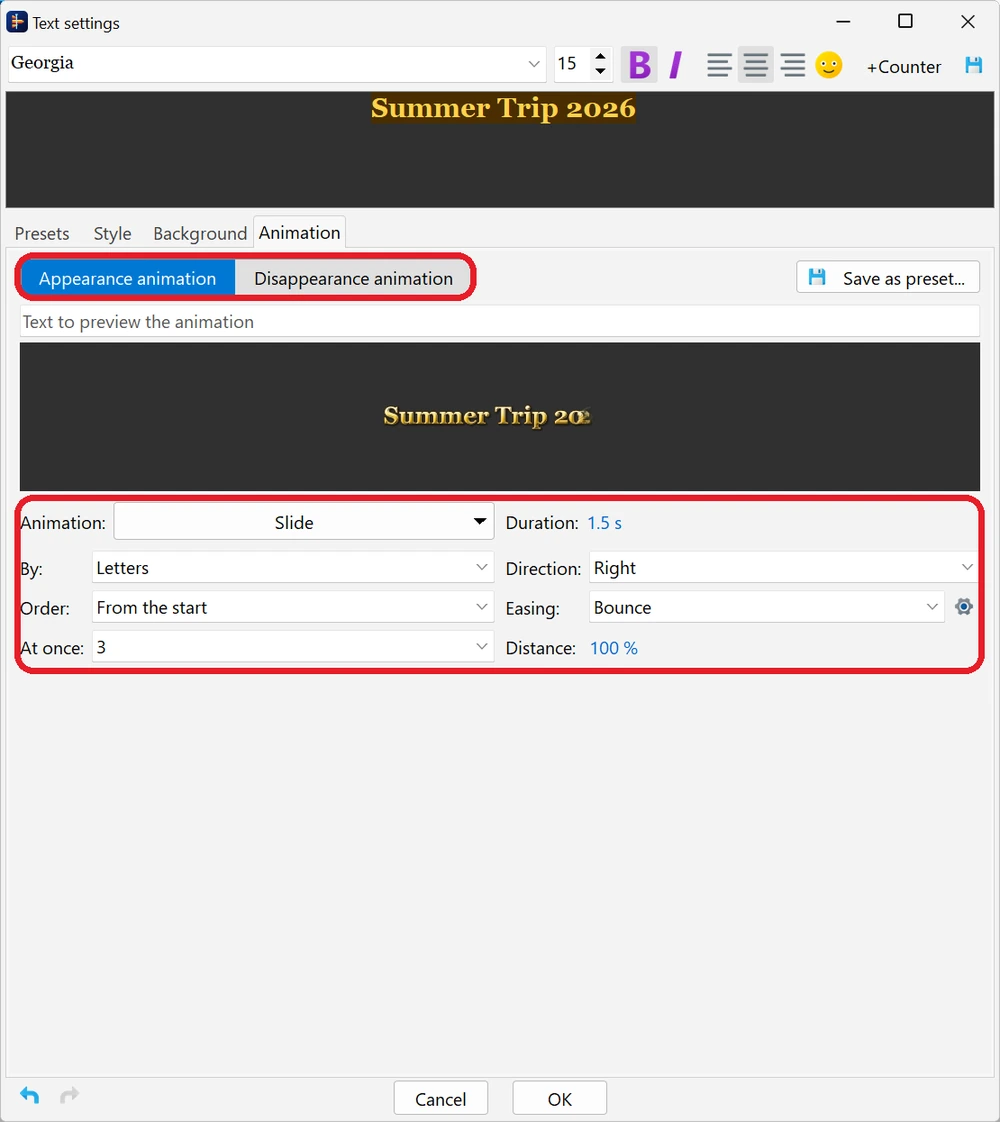
- Animation: — the button with the name of the current animation. Click it to choose another one from the menu.
- Duration: — how long the animation lasts, in seconds. The appearance and the disappearance together can't take more than the whole text block, so making one of them longer may shorten the other. To turn the animation of a side off, choose None in the menu or set the duration to 0.
Which animations there are
-
The Text animation group has 14 animations made for text. They move letters, words or lines one after another, and every one of them works both for the appearance and for the disappearance:
- Fade — letters appear or fade out one after another;
- Typewriter — the text is typed letter by letter, optionally with a blinking cursor;
- Slide — letters fly in from a side;
- Gradient wipe — a soft edge sweeps over the text;
- Grow, Grow and rotate, Shrink, Shrink and rotate — letters grow from nothing or come from a large size, optionally turning;
- Swing — letters swing like on a hinge;
- Flicker — letters flicker like a faulty neon sign;
- Decode — random characters turn into the text, like in a hacker film;
- Flip — letters flip over;
- Assemble — letters fly together from all sides;
- Letter spacing — the text is drawn together from a wide spacing.
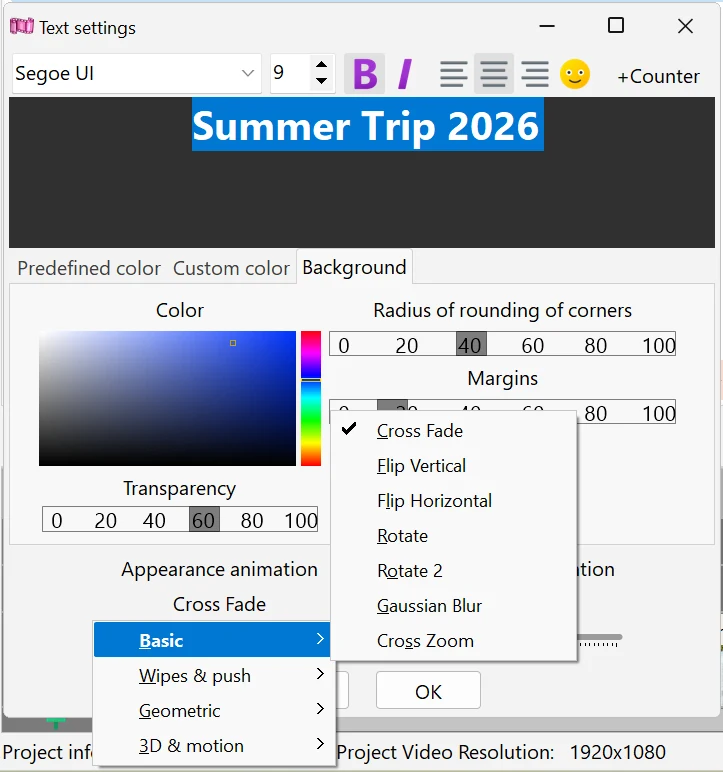
- The other groups of the menu, Basic, Wipes & push, Geometric and 3D & motion, are the transitions you know from the Transitions tab. They animate the whole text block as one picture. A few of them exist only for one side: for example, Unrolling only for the appearance, and Page turn and Slide out only for the disappearance.
Settings of the text animations
- By: — what moves separately: Letters, Words, Lines or the Whole text.
- Order: — where the animation starts: From the start, From the end, From the center, From the edges or Random.
- At once: — how many letters (words, lines) move at the same time: from 1 to 10 or All. With a small number the animation runs like a wave, with All everything moves together.
- Easing: — the pace of the motion: Linear, Smooth, Slow down, Speed up, Overshoot (a little past the place and back), Elastic or Bounce. The gear button next to it (Easing curve settings) shows the curve and lets you fine-tune it, for example the number and height of the bounces.
- Variant: and Shuffle — for a random order, and for Flicker, Decode and Assemble, the button gives another random variant of the same animation.
- Each animation also has its own settings; only the ones that fit the chosen animation are shown. For example: Direction: and Distance: for Slide; the Cursor checkbox for Typewriter; Growth point: for Grow; Start angle: and Rotation point: for the rotating animations; Fly through the camera for Shrink; Amplitude: and Swings: for Swing; Flash brightness: and the frequency for Flicker; Characters: (digits, binary, Latin letters, your own set and others) for Decode; the axis and Angle: for Flip; Spread: for Assemble.
- How to change a number: drag it to the left or to the right with the mouse, or click it and type the value, then press Enter (Esc cancels).
- If the side has an ordinary transition, the settings are not shown; the tab says that you can choose a text animation with the button above.
The background and animation presets
- If the text has a background plate, set on the Background tab how it appears and disappears together with a text animation: Instantly, Smoothly, Reveal or Following the text. The preview on the Animation tab shows the background too.
- Ready-made animations are on the Presets tab, in the Appearance and Disappearance lists: hover the mouse over a tile to see the animation, click it to apply. A preset doesn't change the duration.
- Found a combination you like? Click Save as preset... on the Animation tab: the animation of the side shown there is saved with all its settings, and you can use it for any other text in one click.
Animation on the timeline
- The animations are shown on the text block as red dashed areas at its beginning and end. Drag the inner border of an area to make the animation longer or shorter.
- Right-click the block and open Start/End Effects to set exact durations (0.25, 0.5, 1.0, 1.5 or 2.0 seconds) or remove the animations. More about it: Add Text Comments to Video.
- The program remembers the animations of the last text you confirmed with OK and uses them for the next new text block.
Related topics
- Text Settings Explained
- Add Text Comments to Video
- Add Transitions and Effects
- Scrolling Credits and Ticker
Back to Video Editing Guide.